

Button clicks are tiny actions that hint at user intent. By setting up button click Google Analytics tracking, you can turn these hidden interactions into clear, measurable insights. This helps you understand which calls to action are working, where users might be dropping off, and how you can improve their overall journey.

What is a Button Click in Google Analytics?
A Button Click in Google Analytics is not just clicking a button; it’s a signal that a visitor/user is interacting with your site. Whether it’s a “Buy Now,” “Sign Up,” or “Download” button, each click is tracked as an event. Unlike landing-page hits or scrolls, button clicks reflect what a user chooses to do. This helps marketers understand what drives engagement, which buttons convert visitors into customers, and which CTAs get ignored. Some button clicks (especially outbound links) are tracked automatically, but most internal buttons require to be set up via Google Tag Manager.
By analysing button clicks, you can optimise your website, improve user experience, and make data-driven decisions. Essentially, every click tells a story about how users navigate and interact with your brand online.
Why Use Button Clicks in Google Analytics?
Tracking button clicks is one of the smartest moves in modern analytics. It lets you understand user intent beyond page views. Here’s more in it:
- Micro-conversions matter: Many users never complete full forms or purchases on the first attempt. Button clicks (eg, add to cart) sit between pageviews and final conversions, giving you deeper funnel visibility.
- Better UX insights: If a button gets many clicks but no conversions, you know there’s friction. That’s your cue to redesign, retest, or rethink the copy.
- Know the exact engagement: Instead of assuming a pageview led to a conversion, you can see which button clicks directly contributed to goal completions.
- Performance optimisation: A/B test different button colours, sizes, wording, and placement. With click data, you can zero in on what actually works.
- Boost Conversions: Identify which actions lead to purchases, sign-ups, or downloads, and refine strategies to maximise results.
| Did you know? Nearly 98.1% of Google Tag Manager users also use Google Analytics. |
The Role of Button Tracking in Google Analytics
Button tracking is one subset of event tracking, capturing interactions that reflect user intent. In GA4’s world, everything is an event. Button clicks become first-class signals that feed into your attribution models, funnel answers, and conversion paths.
When set up well, button clicks help you:
- Connect content with conversion points
- Isolate drop-off points in the flow.
- Track micro and macro conversions
- Enable smarter AI models such as predictive conversion, anomaly detection.
How to Track Button Clicks in Google Analytics 4
Here’s a methodical approach to track button clicks via Google Tag Manager and GA4:
- Enable Click Variables in Google Tag Manager(GTM)
In GTM, go to Variables, then Configure and enable built-in click variables like Click URL or any that you want to track.
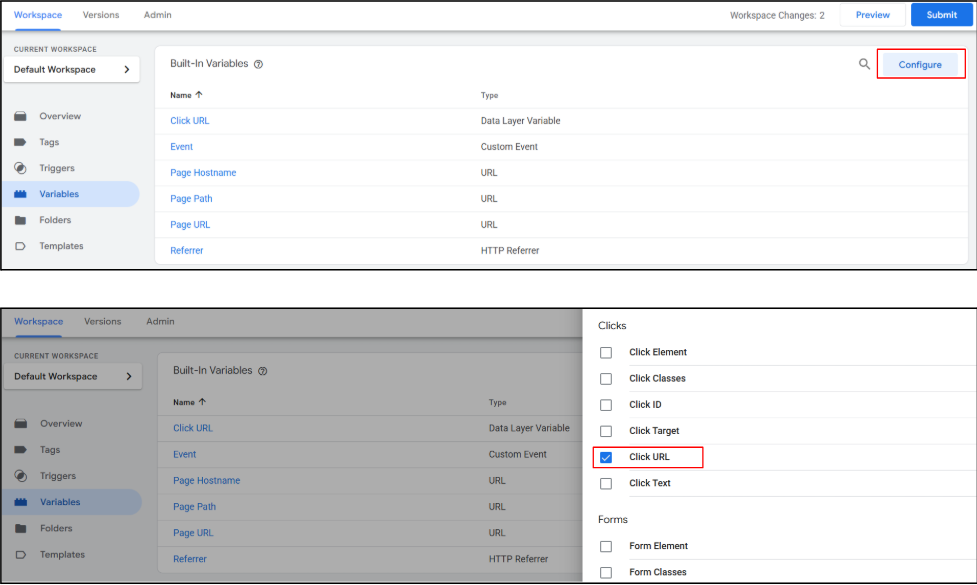
| A variable is a piece of information that can change and be used by your tags or triggers. It can hold things like a page URL, button name, or user action. Configure means setting up what you want to track or use in your tags, triggers, or variables. It’s like choosing which actions, buttons, or events on your website GTM should watch. |
- Create a Trigger
Use an All Elements or Just Links trigger depending on whether your button is an HTML or a styled link. Then conditionally restrict it to only your target button(s) (e.g. Click ID equals “cta-submit”).
| A trigger is what tells a tag when to fire. It’s like a signal: “Do this action when this happens.” It makes sure your tags only run at the right time.An element is anything on your website that a user can interact with, like a button, link, image, or form field. It is the part of your page that triggers actions you want to measure. |
- Create a GA4 Event Tag
In GTM, set up a GA4 Event tag. Name the event (e.g. button_click or cta_submit) and add map parameters like button_id, page_path, and text.
| An event is something that happens on your website that you want to track. This could be a button click, form submission, page view, or video play. |
- Test via Preview Mode
Use GTM’s preview mode to verify your tag fires when that button is clicked. Inspect the data layer for correct parameters. - Publish & Monitor
Once verified, publish changes. In GA4, review under Reports > Engagement > Events or use Explorations to segment by event name.
| Exploration is a tool that lets you dig deeper into your data. You can create custom reports, look at specific user behaviour, and find patterns that standard reports don’t show. |
- Mark as Conversion (Optional)
If that button click is critical (e.g. form submit), you can mark that event as a Conversion in GA4’s admin settings.
Key Benefits of Using Button Click Tracking
Tracking button clicks goes beyond simple pageviews, offering a window into real user behaviour and decision-making on your site:
- Higher-Fidelity Measurement: Unlike pageviews, button clicks capture specific user actions, giving a clearer picture of engagement and interactions.
- Insight into User Intent: Every click denotes something, whether it’s signing up, downloading, or purchasing, which helps you understand what motivates visitors.
- Rapid A/B Testing Power: By tracking clicks, you can test different button designs, placements, and messaging to quickly determine which versions drive the best results.
- Smarter Funnel Optimisation: Identify where users drop off in the conversion process, and optimise CTAs and page flows to reduce friction and increase conversions.
- Better ROI and Attribution: Button click data helps you map the true path to conversions, allowing for more accurate marketing attribution and informed decisions that maximise ROI.
By leveraging button click tracking, businesses gain actionable insights that improve engagement, streamline user journeys, and ultimately drive measurable growth.
How to Integrate with AI for Maximum Utility
Once you have button click data flowing, AI-driven analytics become possible:
- Collect Click Data in Real-Time: Use button click tracking to gather detailed information about which CTAs users interact with most. Feed this data into AI models for analysis.
- Predict User Behaviour: AI can analyse click patterns to forecast what actions users are likely to take next, helping you personalise experiences.
- Optimise CTAs Dynamically: Machine learning algorithms can suggest the best button designs, placements, and messaging to maximise engagement and conversions.
- Segment Users Intelligently: AI can categorise users based on their click behaviour, enabling targeted marketing campaigns and more relevant content.
- Measure Impact and ROI: Utilise AI to pinpoint which clicks result in conversions, calculate the true ROI, and continually refine marketing strategies.
By combining button click tracking with AI, businesses gain actionable insights, automate optimisation, and create smarter, more personalised user experiences that drive measurable results.
echoVME: Where Brands Play and Clicks Come Alive
echoVME Digital is an award-winning digital marketing agency in Chennai, turning ideas into impactful online experiences for nearly 15 years. Founded by Sorav Jain, a leading Indian digital marketer, the agency offers end-to-end services like SEO, social media, influencer marketing, content, ads, web and more. echoVME thrives on creativity, strategy, and data-driven campaigns, helping brands cut through the digital noise. With a passionate team and a legacy of successful campaigns across industries, echoVME not only builds strong online presences but also transforms clicks into meaningful engagement, influence, and measurable business growth.
Conclusion
Tracking button clicks in Google Analytics is not a “nice-to-have”; it’s a must-have if you want to transform silent interactions into meaningful data. By integrating Google Tag Manager, naming conventions, AI-driven insights, and consistent monitoring, you can turn your CTAs into growth engines.
Frequently Asked Questions
1. How do I track button clicks in Google Analytics?
Use Google Tag Manager to set up a GA4 event tag tied to a click trigger (All Elements or Just Links). Configure the trigger to target specific buttons, test via Preview mode, and publish. Then, view click events in GA4’s Engagement or Explorations reports.
2. Can GA4 track button clicks automatically?
GA4’s Enhanced Measurement automatically tracks outbound link clicks and file downloads, but it does not auto-track internal button clicks (e.g., “Submit”) within the same domain. Custom setup via GTM is needed.
3. What parameters should I send with button click events?
At minimum, include buttons like button_id, button_text, page_path, and click_url. These help you segment and analyse which buttons perform best across different pages.
4. How do I mark a button click as a conversion in GA4?
Go to Admin > Events in GA4, find your click event (e.g. button_click), and toggle “Mark as Conversion.” That lets GA4 count it in your top-level conversion metrics.
5. What common mistakes occur when tracking button clicks?
Mistakes include not enabling click variables, using overly broad triggers, failing to test in Preview mode, missing parameter mapping, and ignoring naming conventions or consistency.
